Create, send, and manage invoices with SensaInvoice, the automated invoicing software that helps you get paid faster and simplify your billing process.
Core Benefits of Automated Invoicing Software
Streamline your billing process and improve financial management with our automated invoicing software. Here’s how it can benefit your business:
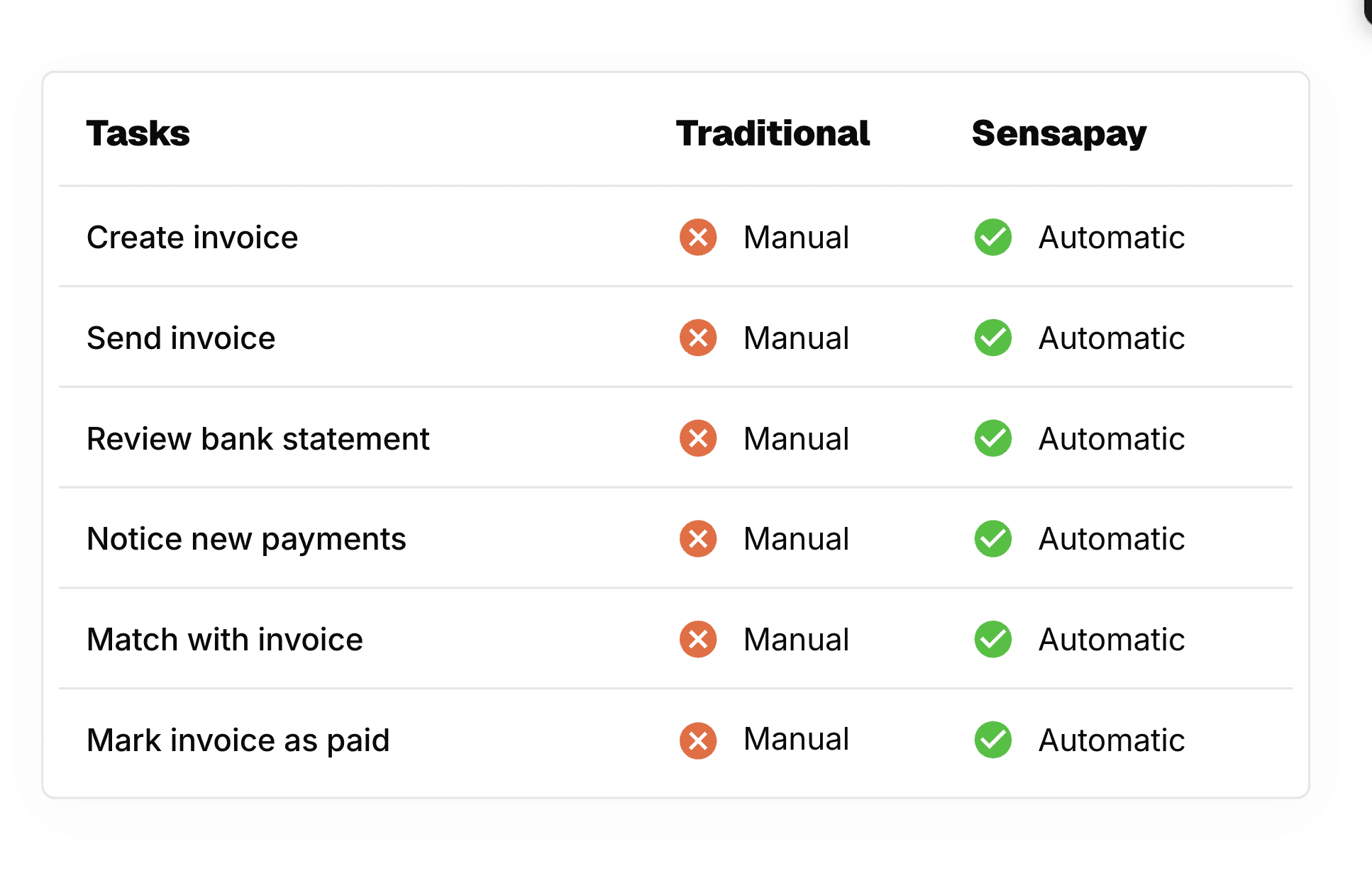
Traditional invoicing can take up to 28 days to process. SensaInvoice changes that. 85% of our invoices get paid within one day. How? We make it easy for customers to pay, and easy for you to manage everything.

No hardware or software downloads required
Works on any device: desktop, tablet, or phone
Flexible pricing tools to reduce processing costs
Automatic reminders: don't chase payments manually
SensaInvoice lets you pull items from a product or service catalog, automatically calculate taxes and discounts, and send the whole thing in just a few clicks. Every invoice includes a secure payment link sent via SMS or email. You get notified as soon as the payment clears.
You and your team get a dashboard that shows every invoice, payment, and customer in one place. Set role-based access so team members see only what they need. Real-time reporting means you can see what's been paid and what's still pending.
Give customers a place to manage their own invoices and payments. They log into a branded portal and pay one or multiple invoices at once. They can save a preferred payment method in their wallet, so future payments take just one click.
Invoicing Solutions to Streamline Your Billing Process
Simplify your payments with our automated invoicing software. From recurring billing to easy one-time payments, our flexible solutions help you meet your customers' needs.
Streamline your payment processes with Sensa Invoice. From credit cards to ACH and e-checks, our solution ensures smooth, flexible transactions while helping you manage costs.
Multiple Payment Methods
Accept credit cards, debit cards, ACH, and e-checks, giving customers the freedom to pay however they prefer.
Pricing Based on Payment Method
Show two prices: one for card payments and another for ACH or cash, allowing customers to choose based on their payment method.
Offset Credit Card Fees
Add a surcharge or flat convenience fee to credit card payments, helping you manage processing costs.
1
Create and Customize Your Invoice Template
Design a professional template that fits your business needs.
2
Set Invoice Schedules and Recipients
Choose the frequency and recipients for automatic invoicing.
3
Send Invoices and Track Payments
Automatically send invoices and track payment statuses.
4
Receive Instant Payment Updates
Get real-time updates as payments are made or overdue.
Use the SensaInvoice API to create invoices and payment links programmatically. Webhook notifications let you know when an invoice gets paid, so your system can update automatically. Works for SaaS platforms, billing systems, payment kiosks, and any business software.
Already using QuickBooks? Keep your existing invoicing workflow. Sync your payments directly with your accounting software. Payments are added to QuickBooks automatically, reducing manual entry and making reconciliation easier.
Start Sending Invoices Today
Stop waiting for payments. Stop chasing customers. Stop juggling tools. Sensa Invoice brings everything into one platform: invoicing, payment processing, automation, and customer management.